City Advent Calendar - Day 2
Posted by CapnRex101,
I think the City Advent Calendar started very well with a charming costumed minifigure and I am curious to see whether today's item relates to the minifigure at all.
Let's open the door and find out...
I have enjoyed the minifigure-scale toys found in many Advent Calendars since 2824 LEGO City Advent Calendar was released in 2010, although their designs have come a long way since then. This bulldozer is presumably based on 60466 Bulldozer and it looks great. I like the curved shape of the cab roof and the treads are splendid, but I wish there was something representing a ripper attached to the bar at the back.
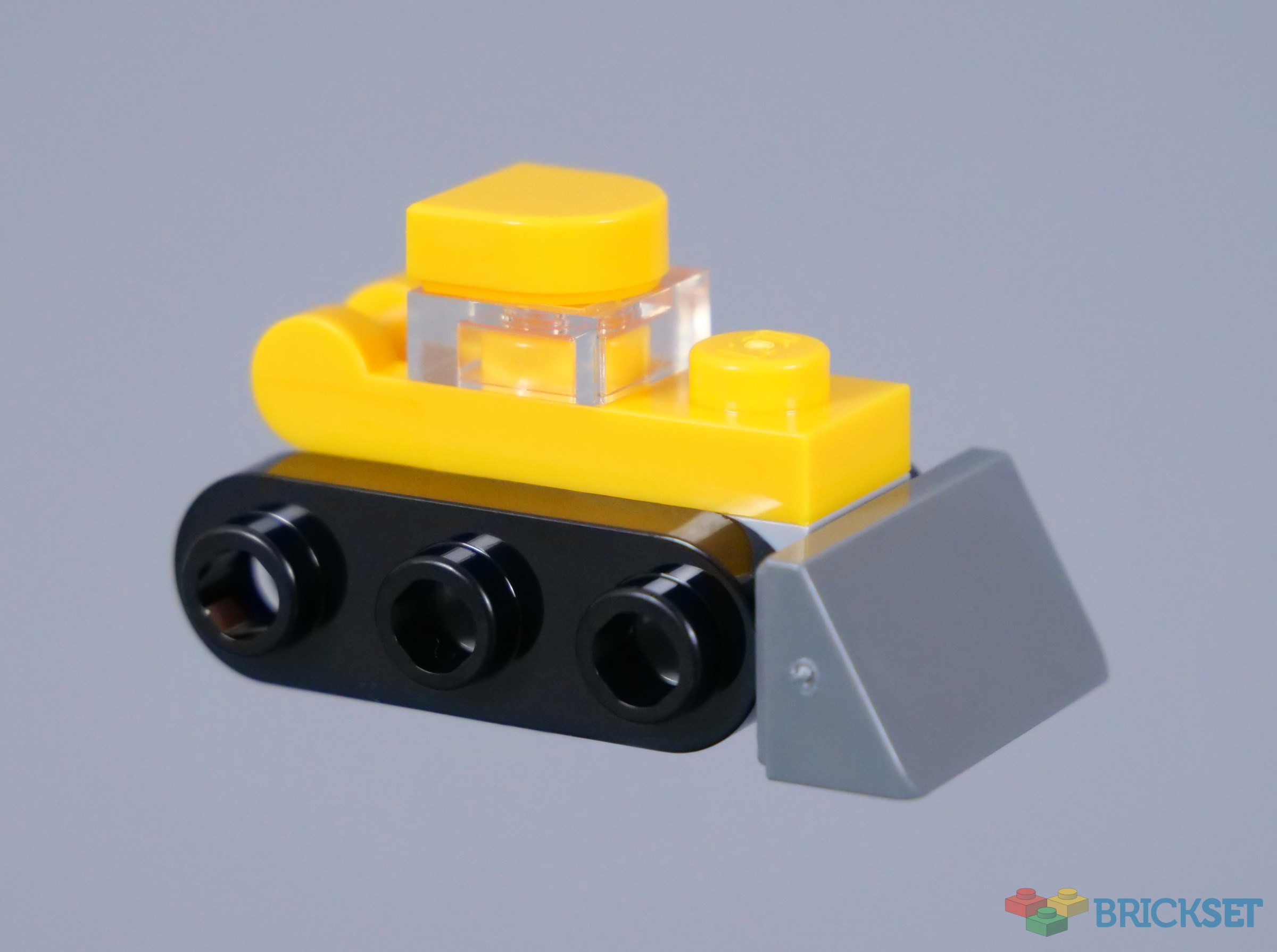
Overall - This is a nice rendition of a bulldozer and I always appreciate a couple of references to sets from earlier in the year in the City Advent Calendars.
48 likes
15 comments on this article
Nice and easily recognizable build!
Snow removal. Essential to hide your tracks.
This is nice. I was thinking about building a toy store, this wil fit perfectly.
You took the photo with a lot of flash!! The yelow pieces in the photo are of the same colour as the 60466. It seems another colour!!
Simple but effective
@HeriSanmi said:
"You took the photo with a lot of flash!! The yelow pieces in the photo are of the same colour as the 60466. It seems another colour!!"
Pretty sure it’s all studio lighting. Flash photography and LEGO models is too wildly unpredictable because you can’t see how the light will reflect until you take a picture. I spent an entire Saturday taking pics with my first digital camera, shot about 1000 images, and deleted every single one because the flash made them all look like garbage.
“I like this one.”
I have the Star Wars Advent Calendar as well and thus far I can safely say the City Calendar is in a galaxy far far away when compared to the Star Wars effort. To quote Darth Vader it is "impressive most impressive".
My son has this calendar. How does he know what to build with the pieces? I didn't see instructions.
@LegoEveryone said:
"My son has this calendar. How does he know what to build with the pieces? I didn't see instructions. "
When you open each door, it should have an image on the back showing what the day’s model is. If it’s really simple, like most minifigs, it’ll just be a static image. If it’s a little more involved, like this one, it’ll show some of the components attached, and others with arrows pointing to where they should be placed. If you’re still having problems with any particular day, you can always check AFOL sites like Brickset. Many of them do AC rundowns, and might give you a better view of the model than what’s on the back of the door. Additionally, check around on the box, as they may have “spoiled” that day, and the model might be shown from a different angle somewhere else on the packaging. Remember that you have to check all six sides of the box, and both sides of the fold-down playmat. They may even be shown coming out of one of the doors on an image of the door panel.
If the back of the doors are too hard to see, you can pull up the set on Rebrickable, and they usually have a link to a PDF that shows each model in a completed state under “Instructions”, as well as having all the door images under “Alternate Builds”, but be aware that clicking on either of these options _WILL_ spoil future days for you, as they don’t do anything to hide individual days at that point.
Here comes the bulldozer.
@PurpleDave said:
" @LegoEveryone said:
"My son has this calendar. How does he know what to build with the pieces? I didn't see instructions. "
When you open each door, it should have an image on the back showing what the day’s model is. If it’s really simple, like most minifigs, it’ll just be a static image. If it’s a little more involved, like this one, it’ll show some of the components attached, and others with arrows pointing to where they should be placed. If you’re still having problems with any particular day, you can always check AFOL sites like Brickset. Many of them do AC rundowns, and might give you a better view of the model than what’s on the back of the door. Additionally, check around on the box, as they may have “spoiled” that day, and the model might be shown from a different angle somewhere else on the packaging. Remember that you have to check all six sides of the box, and both sides of the fold-down playmat. They may even be shown coming out of one of the doors on an image of the door panel.
If the back of the doors are too hard to see, you can pull up the set on Rebrickable, and they usually have a link to a PDF that shows each model in a completed state under “Instructions”, as well as having all the door images under “Alternate Builds”, but be aware that clicking on either of these options _WILL_ spoil future days for you, as they don’t do anything to hide individual days at that point."
I see them now! Thank you, I totally missed this.
My bags are messed up. I’m not sure what I received behind door 2, but it’s not this.
@LegoEveryone said:
" @PurpleDave said:
" @LegoEveryone said:
"My son has this calendar. How does he know what to build with the pieces? I didn't see instructions. "
When you open each door, it should have an image on the back showing what the day’s model is. If it’s really simple, like most minifigs, it’ll just be a static image. If it’s a little more involved, like this one, it’ll show some of the components attached, and others with arrows pointing to where they should be placed. If you’re still having problems with any particular day, you can always check AFOL sites like Brickset. Many of them do AC rundowns, and might give you a better view of the model than what’s on the back of the door. Additionally, check around on the box, as they may have “spoiled” that day, and the model might be shown from a different angle somewhere else on the packaging. Remember that you have to check all six sides of the box, and both sides of the fold-down playmat. They may even be shown coming out of one of the doors on an image of the door panel.
If the back of the doors are too hard to see, you can pull up the set on Rebrickable, and they usually have a link to a PDF that shows each model in a completed state under “Instructions”, as well as having all the door images under “Alternate Builds”, but be aware that clicking on either of these options _WILL_ spoil future days for you, as they don’t do anything to hide individual days at that point."
I see them now! Thank you, I totally missed this. "
First calendar, I take it?
@LegoEveryone said:
"I see them now! Thank you, I totally missed this. "
Just be aware that they only have that same amount of space to show how to build every daily model, and sometimes it is difficult to figure out exactly how to build it. Less difficult than not looking at the back of the door, of course, but still not a cake walk.