Lists for Pick a Brick live in limited regions on LEGO.com
Posted by SetToBuild,
Pick a Brick shoppers living in the US and GB, rejoice! The Bricks and Pieces Team continues to improve your shopping experience, giving new ways to part with your coins for more plastic goodness.
Further enhancing the upload list feature from 2024, you can now create lists to collect parts for later purchase. Note: you can only save pieces that you can currently see on Pick a Brick.
Read on to learn how to use this new feature.
Pick a Brick List Tutorial
Click on the heart to the right of the bin icon to begin!

In the Save piece menu, click the Create a List button.

You can also select how many pieces you’d like for rapid add-to-trolley acquisitions. After creating a new list from this screen, be sure to click the add button next to your list to actually save the part.

Access your lists from the heart icon at the top of the page, to the left of the shopping bag, and scroll down past the Sets & Merchandise section to the Saved Pieces section. You will have to click on the arrow to expand this section.

Within a list, you can select all or some of the pieces, and filter/sort your list. You can even filter to see what is currently available. When you’re ready to buy your pieces, click the Pick selected pieces button on the right.
Currently, you can also download your list, but you cannot yet upload to it. Hopefully there will be a future update to save some steps.

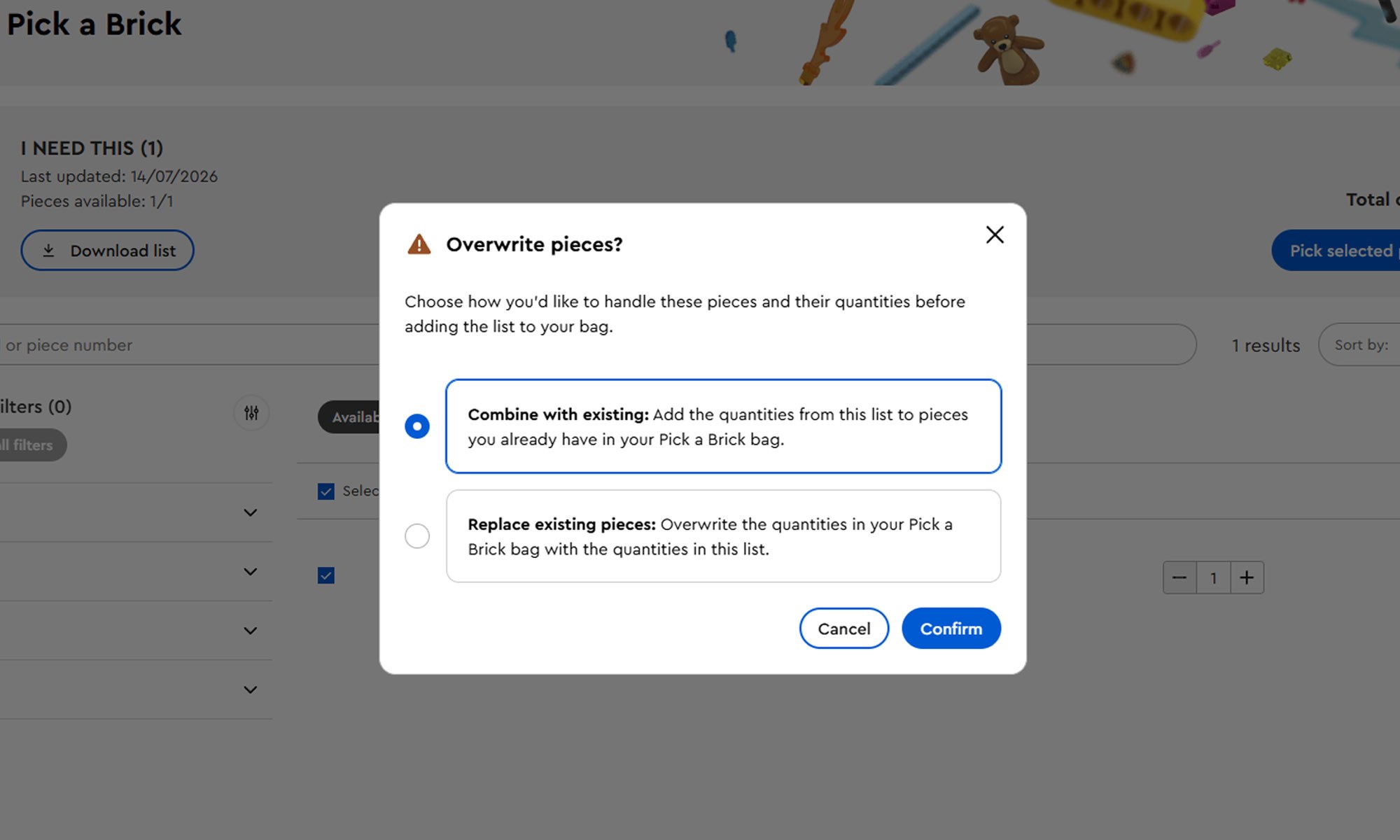
If you're already working on a bag of parts, you’ll be met with this message asking if you’d like to either combine this list with existing pieces or replace them with the existing pieces.
Pats on the back to Huw for creating such tools as the PAB parts wanted list tool for Brickset users in the meantime while we waited for this to launch! Though there may still be circumstances you want to use this, especially as we let the PAB developers work through any teething issues.
What next?
This sought-after feature is welcomed by many, but hopefully it improves with time. Feedback can be given through LEGO.com, but you may also consider joining the unofficial Bricks & Pieces Discord server to be on the forefront of more news and features along with fellow Pick a Brick enthusiasts.
Go forth, and create a list for your next MOC masterpiece!
Thanks to @Stubot for pointing out this new feature and to @NeoThermic for helping me with the article!
54 likes
13 comments on this article
Thank ye for informing us! I do wish that this feature will show up in other countries as well.
I've sort of been doing this for a while anyway, just adding pieces I wanted to keep track of to the cart. The downside is that you can only have one list and you lose it if you need to checkout a PAB order. But it has been much easier since the carts are now permanent whereas they used to be cleared every so often in the more distant past, meaning the need to keep an offline list in a spreadsheet or pencil and paper.
But as a workaround if you use multiple accounts then you can use multiple carts, although this new addition is clearly beneficial.
4 quid for a single windscreen? They certainly saw you coming!
As someone who uses PAB monthly I've been asking for this for a long time, shame I'm not in the region to test this.
I usually build my cart throughout the month, and then occasionally wait a little bit longer to buy it for double points or certain GWP, so in that regards the cart is good to maintain it, but you don't have visibility on when something is gone, or when something is removed or discounted.
@CCC said:
"I've sort of been doing this for a while anyway, just adding pieces I wanted to keep track of to the cart. The downside is that you can only have one list and you lose it if you need to checkout a PAB order. But it has been much easier since the carts are now permanent whereas they used to be cleared every so often in the more distant past, meaning the need to keep an offline list in a spreadsheet or pencil and paper.
But as a workaround if you use multiple accounts then you can use multiple carts, although this new addition is clearly beneficial."
I’ve been doing this ever since they gave the bags permanence by just working up an order until there’s enough in it to avoid paying shipping or handling fees, and then just placing an order.
@FlatSixLego said:
"As someone who uses PAB monthly I've been asking for this for a long time, shame I'm not in the region to test this.
I usually build my cart throughout the month, and then occasionally wait a little bit longer to buy it for double points or certain GWP, so in that regards the cart is good to maintain it, but you don't have visibility on when something is gone, or when something is removed or discounted."
There is a bug in that if you have something in your cart and they mark it as out of stock, you can still order it. I've done this in the past and still received the parts ordered, even though they could not be ordered if starting a fresh order. Whereas if it is removed from PAB, it goes.
@jsutton said:
"4 quid for a single windscreen? They certainly saw you coming!"
It's a big windscreen :-)
Nice to get that, so you can fill up bit by bit until you're beyond the service fee threshold. Acquiring BL paid out!
This is nice. The obvious upgrade I'd love would be if I could get a notification when a particular new element is available, or when a part becomes available in a specific colour.
@monty_bricks said:
"This is nice. The obvious upgrade I'd love would be if I could get a notification when a particular new element is available, or when a part becomes available in a specific colour."
That would be a great upgrade! In the meantime, the Discord server I linked at the end of the article has a system that lets you set up notifications for specific pieces. Back when the Wolfpack torsos were more rare, I greatly appreciated the feature! (Sorry in advance to your wallet.)
@SetToBuild said:
" @monty_bricks said:
"This is nice. The obvious upgrade I'd love would be if I could get a notification when a particular new element is available, or when a part becomes available in a specific colour."
That would be a great upgrade! In the meantime, the Discord server I linked at the end of the article has a system that lets you set up notifications for specific pieces. Back when the Wolfpack torsos were more rare, I greatly appreciated the feature! (Sorry in advance to your wallet.)"
I'll have to look into that because that has been my most wanted feature for years now.
Yesterday, I was claiming that the price of the latest 11386 SpongeBob SquarePants: Bikini Bottom! is 40 CHF to expensive comparing with US, UK and EU.
Today, I noticed that lot of pieces are less expensive in Switzerland comparing to UK.
£3.97 vs 3,82 CHF for your WINDSCREEN 1X14X6, NO. 1
Could be because we don't have the new feature for now ;-)
@jkb said:
"Nice to get that, so you can fill up bit by bit until you're beyond the service fee threshold. Acquiring BL paid out! "
You can already do that with the standard bag system. When you add parts to your bag, they have permanence (meaning they don’t automatically disappear after a fixed amount of time). So you can just keep adding parts until you have enough to justify placing an order. You can even still shop on the main website, and as long as you haven’t added the bag to your cart, it will stay parked off to the side until you call for it. If you do accidentally add it to cart, you can simply delete it from the cart and it will go right back to OPAB. Another handy feature is that, if you’ve got parts loaded into both Bestseller and Standard, and you’re ready to order one batch but not the other, it shows up as two separate items in your cart. Delete the one you want to wait on, and it goes back to OPAB while the other half stays in your cart for purchase.
What this allows you to do that you’ve never been able to before is basically maintain two separate bags, so you can order both PABB and PABS now, while leaving more PABB and PABS prepped for a future order. It also appears that it might allow you to mark items for future purchase even when they’re marked Out Of Stock, if you’re logged in. Before, all you could do is look at an OOS item and copy the element ID or part numbers to keep checking back.