Tags: a new way to search the database
Posted by Huw,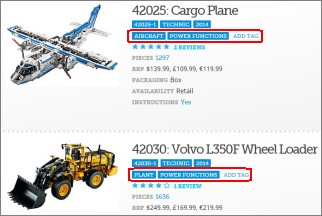
Today, I have introduced a feature to the site that is long overdue: set tags. Tags can now be assigned to sets which will make them easier to find, and easier to view lists of related sets.
In essence, this is an extension of the current 'tags' in the database for theme, sub theme and year, the difference being that sets can have an unlimited number of tags and they are assigned by you: anyone who's logged in. Their success will rely on you doing just that.
For demonstration, I have tagged Technic sets with tags like 'power functions, 'plant', 'pneumatic' etc. which are attributes of sets that are not currently in the database. This means you can now find all pneumatic Technic sets easily. (It's possible I've missed some, but it doesn't matter because YOU can add the tag if you notice that a set is missing one.)
Tags appear under the theme and sub theme in the detail view of set listings, and in the side panel of set details pages. If you're logged in, you'll see an Add Tag link there too. When you click on it, a pop-up window will appear allowing you to add tags and, if you've entered some already for the set, to delete them.
Tags also appear in the suggestion list of the main site search (top right). All tags in the current search results are shown in a drop-down list, like theme, year and so on in set listings (e.g. in this Technic list) enabling you to filter the results, and you can see all tags in use in the database at the bottom of the set browsing page.
So, I encourage you to use the system and add tags that are meaningful to you and which you think will be useful to others. For example, Star Wars sets could have tags assigned to indicate that they relate to the rebel alliance, to imperial forces, or where they are based: Tatooine, Naboo, Endor etc. etc.
Moderators can delete tags and will be keeping an eye out to ensure they've been assigned appropriately. In particular, tags must not be subjective (e.g. 'best star wars sets') or personal (e.g. 'sets I own') and should not repeat information that's already available in the database (e.g. 'contains Yoda', 'has over 1000 pieces', 'polybag').
Happy tagging!
Update: Adding tags has changed, please see the topic in the forum for more information.
0 likes
78 comments on this article
Seems like a good feature, but also like a hard job for moderators to maintain a quality and a system.
To everyone:
Use it the tagging wisely and it will work fine for all of us!
Yeah, tagging stuff with "Cool", "best" or "boring" is not good tagging.
So be objectively descriptive
There is some great tagging going on already resulting in some useful lists taking shape, e.g. http://brickset.com/sets/tag-Octan , which is good...
Great feature! I will be responsible for the Octan tags :-p
Awesome job! Another thing I'd like to see is a tag for exclusive sets.
A tag for sets with no stickers only printed bricks
^^ Go right ahead add add them then :)
^ Not sure about that one, but I guess a 'no stickers' tag could work.
If the tagging implementation has a suitable weighting system, then whether someone occasionally tags a set as "is cool" or "has yoda" is moot, it should hopefully be weighted out of visibility by the more popular tags.
Very nice feature - just tagged a few trains!
Also, sorry to be pedantic, but there's an 'eye' missing from "... will be keeping an out to ensure ..." :)
Thank you for this extremely useful feature. It'll be so much easier to track my obsession with all things classic space logo and my son's obsession with fire chi etc.
Is there a syntax we can use to generate links from comments to particular tags? The very useful '' is great for set numbers but something for tags would be very popular I think.
Excellent new feature, although there are already some dubious tags starting to appear.
If tags continue to multiply at the current rate then set listings might start to get very long; it might therefore be worth considering adding the ability for users to suppress all but the Brickset-defined tags.
^ Was just thinking about this. An I/O filter for tags would be very useful.
^^ Agreed. And/Or have user-defined tags be private and only become public when curated by moderators. Dunno which is more work - deleting bad tags or promoting good ones. One potential benefit of having the private tags would be to solve the problem stated in the forums where users want multiple ways to categorize their collections.
I did wonder about listings being overwhelmed by them. I guess I will wait and see what things are looking like after a month or so.
Who's added what and when is recorded so 'official tags' could be filtered and indeed if someone is found to be adding dubious ones they can all be removed easily.
And it if all looks like it's gone pear-shaped and it turns out some form moderation is needed, they could all be made private pending a rethink, or approval. Nothing is being added that can't be undone or traced, so we should be OK.
BTW, a total of 177 tags have been added 908 times so far...
I have a question regarding the tags. I recently added the "William Furno" tag to all sets containing Furno (from HF). This, I believe, would be convenient in order to quickly view all sets that contain him, or his minifig version. My question: Does this clash with your "do not repeat information" rule? All sets that Furno is in mention him in their set names, I believe, but I also think that adding the name could help things along quite well.
EDIT: Not all his sets contain his name. For example 66471.
^ I think that is OK as would be tagging all Bionicles with the name of the Toa
Awesome, glad to see this feature on the site!
A great feature thats overdue. What about applying the same to minifigures?
Excellent idea!
Completely agree with the 'let it run for a bit and see how it goes' rather than clamping down on tags that some people think aren't appropriate.
Common sense wins out in the long run, so let people do their thing and this could turn into something hugely beneficial.
^^ One step at a time, let's get this working first :-)
I accidentally added the tag "Polybag" to 40082-1 , but I don't see the facility to remove it as described above. I've probably done something else stupid, here.
EDIT: Ah yes, that something else would probably be "tagging things with "Polybag"."
This is a awesome idea but how can you be sure about the information ?
@Gnac, click on add tag for that set and you should see a list of those you've added with a delete link next to them.
But, polybag is not a tag that's needed anyway because it's recorded elsewhere in the database.
@Onat the legoman and @thehornedrat , I have to say I'm somewhat overwhelmed by the number that have been added already, many that I would not have thought of adding and which look to be fairly meaningless to most people. But, I had no way of knowing what would happen until I opened the floodgates so it's going to be a bit of a learning experience.
As I said above I can always delete or hide them all and start again with some moderation if needed, and by the looks of things already it's needed...
Cool beans! Here are some tags I've been adding to sets that other people might be able to help add to other sets:
"Converts" (for sets that have a transforming function)
"Floats on Water"
"Electric Motor"
Great, Huw! Thanks for adding this feature!
Hopefully it won't be too much of a headache due to people going overboard. It takes a little bit of thought in knowing what tag is adding *new* information about a particular set.
For example, POLYBAG is redundant because that is a packaging type.
Great! Have added tags to the Agents sets.
Problem with some info that's already in the database is that you can't search for it without going into the query builder. Things like the airline promotional sets don't say so in any way you can easily search or link sets together. But with an 'Airline Promo' tag they all come together with a single click.
I'd suggest putting the tags at the bottom of the summary, where there's more room for them to grow. Also display the tags with a non-breaking format. And have a separate drop down so that 'tags' becomes another option to search alongside 'sets' and 'parts'.
I've created a "Celebrity" tag for sets containing minifigures of real-life people, such as the F1 drivers in the Ferrari sets or NBA players in Sports. I've gone ahead and tagged those but I'm sure I must be missing others, I don't think any of the other Sports themes contained real-world personalities, though I may be wrong...?
Can the tags be user specific? So, if someone chooses to add lots of daft tags, only they see them when logged in rather than every user? I'd like to add some tags but I doubt everyone will appreciate some of them plus set listing details will inevitably become saturated with tags no doubt
^ Good points although I'm not so sure about a tags drop-down given that they are a property of sets rather than at the same level, as it were.
I'll tweak the CSS to prevent wrapping: can you provide an example of one that does to test with please?
I don't like them and hope we get the option to hide them. Just looked at Star Wars and a few sets have been tagged wrong for my liking.
I just went through and added "Light Brick" to every set containing the 2x6 LED brick. It looks like someone had a similar idea, but only did 2 sets with the tag "Lightbrick" as a single word. I discovered this about halfway through my tagging. Perhaps a mod could clear out those 2 sets with the double tagging? There were about 24 sets total tagged with "Light Brick".
Very nice feature!
I remember discussing the limits of themes & sub-themes in the forum a while back when some of Lego's new labeling came out. Looks like this will be a good way to fix the theme issue and a really convenient way to make some more concrete lists/categories for the entire community.
At some point (once everything is working) maybe tags could have upvote/downvote options to weed out inappropriate & redundant tags. Maybe a way to browse by tags would be nice, too.
Good work, I'm sure this took quite a bit of time!
EDIT: Nevermind, I see you can already browse by tags!
@Huw
I don't get a list of tags to delete, so it's probably best that I suggest some mass deletions. I nominate "Christmas", "Polybag", and "Not Polybag". Cheers for the work and dedication, despite this weird happening. Tis very nifty.
^ Sorry Huw, I can't see an example of word-wrapping at the moment. I noticed it when I added 'Airline Promo' to something that someone had already tagged with 'Airplane' (presumably because they can't spell 'Aeroplane' :D ). When my tag came up after 'Airplane' it word-wrapped. But if I re-visit the set, alpahabetically, 'Airline Promo' comes up first and doesn't wrap!
Here you go - it's a long tag (not to mention completely redundant since 'Modular Buildings' is already the clickable sub-theme) but it wraps when you view a single set:
http://brickset.com/sets/tag-All-Modular-Buildings
ASTEROID FIELD as a tag? Useful, it identifies one Star Wars set... I'm sure there'll be thousands more to follow.
BIG FIG? Oh dear
@CCC - From my database management perspective, the information is already present in the set number range and the packaging type. So if I was writing a query I have at least one way to determine that.
However, I agree that ease of use trumps the redundancy, especially if the tags are meaningful, consistent and correct.
I've made a couple of mistakes tagging, and would like to fix them, but can't see the delete tag thingy. Help!
Nope, delete doesn't come up for me either. I added 'Haunted' as a tag, only to find someone was adding 'Ghost' to any sets with ghosts in them, so I switched to that. But I can't remove 'Haunted' from 1382-1.
Is "Tags" an appropriate way to mark which LEGO sets were designed by which LEGO employee, or would you rather implement that in a different way?
It would be neat to see all the LEGO Architecture sets by Adam Reed Tucker vs. Michael Hepp, Rok Kobe , etc...
^ I'd say it's a valid use of them.
As for mistakes and duplicates spelled slightly differently, I'll go through them at some point and sort all that out and provide tools for moderators to merge them and so on.
@gmonkey76 I'm with you on this one. Star Wars is my main interest and there's mistakes and inconsistencies.
I have now been through the Star Wars theme and tagged sets appropriately. My policy was to add the faction (where possible), the Episode (where not already specified) and a planet where one was clearly relevant.
For example, vehicles which appear on various planets are not tagged with a specific location, while sets which are obviously based on a particular planet are. I have also tagged sets with a planet where the subject vehicle does appear on more than one (eg. the Droid Gunship) but in some cases it is clear where the set is based, as in the case of 75042 for instance where Chewbacca is present.
If it is treated properly I think this could be an excellent feature, thanks to Huw for implementing it.
I see the REBELS tag has been added to some non-SW Rebels TV show sets... Shouldn't that one be REBELLION?
Without a list of "conformed" tags, we're going to run into this. Ideally, one tag has the same meaning everywhere, but that's asking a lot from such a diverse collection of elements. IMPERIAL is a decent example: meaningful in more than one theme (Star Wars and Pirates, perhaps), but you might be disappointed (or impressed) to see Imperial Flagship tagged next to Imperial Star Destroyer!
^ I like the Star Wars tagging so far. I do like to set up planet themed displays so I do this with my sets already. It's nice now to be able to go browse for Hoth sets and see if Ive missed anything or check at a glance what Tatooine is going to get added this next wave.
There do seem to be some inconsistencies with some of the starships as they relate to or were seen in the movies, but as far as matching the planet to the box art, looks like its coming along nicely. High Five
Maybe it's a glitch with my phone, but I can't for the life of me find the list of tags I've added to remove them. Whenever I click add tag it's the same box.
I've gone through a lot (although far from all) of the 1980s and 1990s Lego Space sets classifying them as "base", "ground vehicle", and "spaceship", which is generally clear enough, although of course with any classification there are edge cases (do you add the "ground vehicle" tag if there's a small rover in a larger spaceship, as with 6932 ?) I also wonder if I should have said "space base", but I thought you could filter by theme first. Still, hopefully a page like http://brickset.com/sets/theme-Space/tag-Base shows that it's useful.
Anyway, thanks for the experiment. One thing I remember from Flickr's tagging implementation is showing who added a tag as the alt/hover text, which might be nice (and help to cut down on the worst abuses). Allowing a user to delete their own tags would be nice, too.
Trade Federation Vulture Droids tagged as 'Separatists', Trade Federation Battle Droids which ultimately became part of the Separatist movement tagged as 'Trade Federation', Slave 1s tagged with 'Bespin' whilst others tagged as 'Cloud City'. These tags are just going to identify random sets for me! Sorry
@TitanArch - Good point concerning the Rebels, I am changing it to Rebellion at the moment.
@mr_skinny - Droids and droid vehicles based in Episode I are marked as Trade Federation as the Separatist movement had not formed at that point. I have not based tags on which member group of the Separatists contributed each vehicle as that would be of very little use.
I am currently in the process of editing 'Cloud City' to 'Bespin' for the relevant sets.
> One thing I remember from Flickr's tagging implementation is showing who added a tag as the alt/hover text, which might be nice (and help to cut down on the worst abuses).
Great idea! I think that can be added, I'll take a look.
I went and tagged all the female CMF minfigs: http://brickset.com/sets/tag-Female
Incredible, 419 different tags have been assigned just under 4000 times so far.
It looks as if there's a lot of sorting out to do and merges to be made, but I'm happy to let it carry on as it is at the moment and consider how best to manage it once we can see how it's working out.
Great addition Huw :-)
Why is the 70804: Ice Cream Machine tagged "Octan"?...
I have an issue:
I, and some other users I see, have tagged some BIONICLEs with their elemental power (e.g. Fire, Water, Ice, etc.) This, however, could cause problems, because there's also LEGO City Fire? Meaning the "Fire" tag will lead to both types of sets. Perhaps a mod could change all of the BIONICLE element tags to something along the lines of "Fire Element", "Fire Toa", etc? Someone who understands BIONICLE enough to get it all right, anyways.
Another thing: @Huw, tagging is really fun to do, because it's A) Easy B) Productive and C) allows you to show off your LEGO knowledge. :P I really like the tags. Plus they're useful. Win-win-win for everyone!
Another suggestion!
Currently tags are alphabetically ordered. Maybe you could order them by how often they are used? That way the "most important" ones are first (e.g. Toa for BIONICLE) and the least important (e.g. their name) are last. As well, then the most popular ones are always first on their lists. Otherwise, if "Toa" is sometimes first and sometimes in the middle, I personally think it doesn't look the greatest. Just a thought to chew on!
Nice idea, but never underestimate the stupidity of some people ;)
Either this feature is going to take off and the moderators will be overwhelmed with stuff to check, or there'll be a spike of activity now, gradually dying down to a low average in a few weeks time.
@CapnRex101
"Droids and droid vehicles based in Episode I are marked as Trade Federation as the Separatist movement had not formed at that point"
Quite agree :-)
With this analogy sets 8001-1, 8002-1, 30058-1 and 75029-1 should have a TRADE FEDERATION tag?
Besides, I doubt everyone will conform to the box art to link the vehicle/playset to a movie or period within the franchise. 75015-1 has box art depicting Episode II but most will relate such a droid to Episode III on Kasheeeeeeeeeeeeeeeeeeeeeek
So my argument still stands that the tags will generate random lists with something as vast as Star Wars
> This, however, could cause problems, because there's also LEGO City Fire? Meaning the "Fire" tag will lead to both types of sets.
I don't consider that a problem, and identical tags across multiple themes is likely to be fairly common. Once you've clicked on a fire tag you can narrow down the results to a specific theme if you want to.
Given the number being added (now over 5000) it might be necessary to suspend additions at some point, take stock, and decider whether it's working or not in its current form. Watch this space...
@mr_skinny - I have changed 8001 , 8002 and 75029 as you are quite right, I must have missed those when I went through them. I am going to leave 30058 tagged as 'Separatists' since I do not think it is specifically based on any of the prequel trilogy films given the packaging artwork.
75015-1 is admittedly an anomaly, but it should be listed under Geonosis in my opinion as the set is based on the vehicle that appeared in shots which did not make it into the film.
I think there are applications for the tagging system in the Star Wars theme as although not every set can be easily categorised, the vast majority can. As time goes by more tags will be added and people will be able to search even more narrowly within the theme. If anything it is a particularly helpful feature in the larger themes like Star Wars.
^ 30004-1 is Separatist, 30058-1 is the one flying around Naboo ;-)
^ I disagree. The brown version's design may have originated in Episode I, but this cannot be confirmed as the packaging suggests it is based on the Clone Wars. Clearly that is just a design choice implemented by TLC, but it still suggests that the set was released as a generic STAP from the Republic era rather than one based on a particular scene from Episode I.
The blue one is definitely Separatist as it is fighting for the CIS during the Clone Wars. It is contributed to the war effort by the Trade Federation, but if one was to tag in that way you would have to attribute all Separatist vehicles to their manufacturers, which I think has little value.
Note to everyone: there was a bug that prevented you from seeing the tags you'd added already and thus you couldn't delete them. I've just fixed it so if you've made any mistakes, please go back and correct them.
I think the fluidity of the tags makes them a very versatile tool. If I click on the "fire" tag, I'm going to get quite the menagerie of sets, but that's pretty cool. Most of the sets will probably be red, orange, & yellow and have some form of flame element in them, but if I want to narrow those down, as Huw pointed out, I can do that by selecting a particular theme (along with sub-theme, year, my collection, & category.)
Once people get good at tagging & filtering, they'll end up with what they want. I have a feeling the broad range you get with some of the less specific tags will end up being quite interesting...
Wow. Tag frenzy. Watching it unfold... Must. Not. Start. Tagging... OCD... Aargh! ;-)
We should also stick to world wide acceptable terms - Plant for motor might not be a good idea for Technic right??
Plant = Any type of mobile construction machinery according to http://en.wikipedia.org/wiki/Plant_ (disambiguation)
To Chilis_no in Norway, the 70804: Ice Cream Machine has an "Octan" sticker with an ice cream cone. Apparently a petroleum based dessert.
@paulmison I love your work on the space sets. I was about to get started on it. I think sets like 6970 that have a substantial spaceship should have this tag along with the base tag. It'll be a great way for space fans to keep track of all their spaceships. I've started a similar tag for pirate ships that tend to go across themes, it makes it so much easier to look things up. @huw, thanks for adding the feature.
@CapnRex101 Why does the packaging of set 30058-1 suggest it's a Clone Wars set when when sets 30056-1 and 30057-1 have the same packaging and are not from The Clone Wars?
I'm more curious than critical!
^ I believe the planet in the background on 30058 is supposed to be Teth, a planet which only appears in the Clone Wars.
^ Like the rationale. I didn't notice a planet in the background when I ripped the packet open :-D
Certainly good to look up aligned things or specific types of sets , instead of like it used to be going through the entire theme list.
Are the moderators removing all tags that are duplicates of words contained in the titles? It could be very useful to pull all sets across themes that have certain elements without resorting to titles. If someone wanted to make spiders for Halloween, they wouldn't want to wade through a list including all the Spider-man sets.
The following sets have nice brick built spiders.
4738: Hagrid's Hut - has "Spider" tag
9470-1: Shelob Attacks - "Spider" tag has been removed and not allowed
79001: Escape from Mirkwood Spiders - "Spider" tag has been removed and not allowed
Despite being a Technic connoisseur, I admit that I have never heard the word "Plant" to represent construction machinery before so I came to read this comment section to try to figure out what it meant. I have my answer, but I think many people would not associate this word with this meaning.
I like the tag idea in general, but also think it is only useful if there is a manageably small number of available tags.
Did the "ADD TAG" function get suspended... or is it just my browser that suck?
(Safari 8.0 - MacOSX 10.10)
Is the tag display/add function currently suspended? because I can't see the tags assigned to the sets.
edit: OK, I've seen in the forum they are hidden until they receive approval. When I eventually decided to use the feature...
Is the tag polybag approved? really like that tag as polybag is a huge category on its own. The same goes with Magnet, LED Torch, Books with Minifig, Disc (DVD/BlueRay)