Suggestion box: first ideas implemented
Posted by Huw,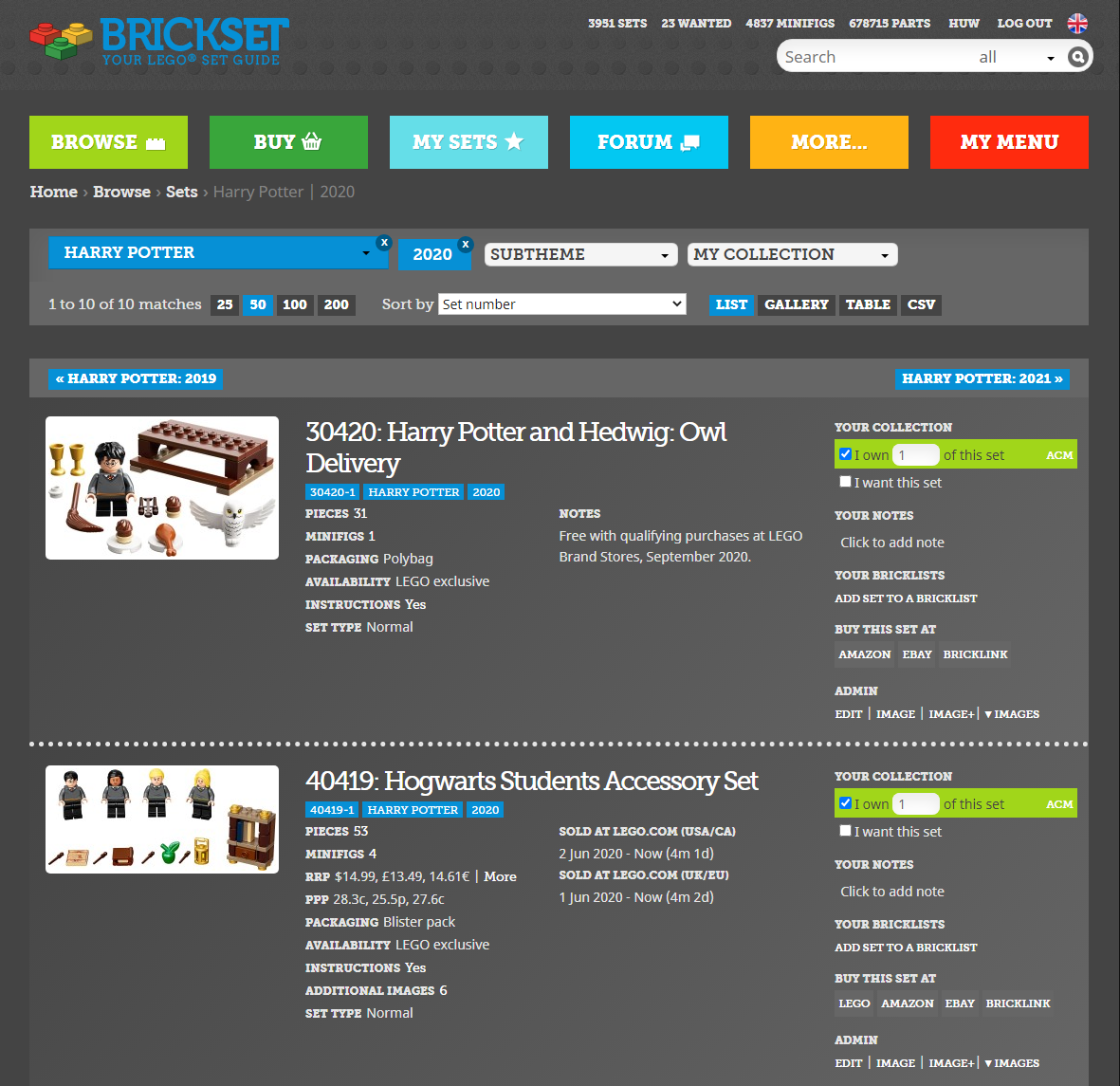
Our new suggestion box has attracted almost 100 ideas in just a few days, which has exceeded my expectations by some margin. They will give us plenty to work our way through in the coming months.
I have implemented a few of the easier ones already and also one whose popularity surprised me somewhat: dark mode. It had been suggested before but I dismissed it as a bit frivolous. However, CharzBoi's submission attracted over 120 supporters, so clearly there are a lot of you who view Brickset in the dark!
At the bottom of every page you'll now find a 'Switch to dark mode' which will do just as it says. I've spent quite a lot of time working my way through most of the site to check that everything looks OK and is legible but if you notice anything that doesn't look right, please let me know.
You can find out what other ideas have been implemented already on the completed list and if you have any more ideas, do please submit them.
139 likes
61 comments on this article
That's great! This dark mode is amazing! :)
Yes Dark Mode, finally! Thanks for putting in the work and improving Brickset.
EDIT: I also like the new shading on the comment boxes.
Yay! I use dark mode on every website/app it's available on. But in dark mode, a lot of text doesn't appear blue but instead is white, and it changes to blue (if it was white before) or to white (if it was blue) instead of turning a different shade of blue.
Thanks, Huwl. I like the dark mode for the early morning check in.
This is amazing!
Also thank you for fixing the flag problem I had. I know it's not the most important thing in the world but I appreciate it non the less! ??
Dark mode is very appreciated, thank you.
@mr_Fikou said:
"Yay! I use dark mode on every website/app it's available on. But in dark mode, a lot of text doesn't appear blue but instead is white, and it changes to blue (if it was white before) or to white (if it was blue) instead of turning a different shade of blue."
Hyperlink text is white and will change to blue on hover. That is a bit of a compromise because some links are not that obvious and it's likely that I will work on improving it if and when I find the time.
I've also learned that it's possible to detect when a phone is in night/dark mode so I will see if I can utilise that to switch automatically.
Dark mode :) great for reading late at night or early morning without burning my retinas.
Brilliant! Currently 11pm in NZ and dark mode is doing the business! Just one teeny, tiny thing - is there any practical position for the switch nearer the top of the page instead of right at the bottom? Because, y'know, it's sooooo much hard work to scroll all the way to the bottom then all the way back up to what you're reading. (And thanks, @Huw. Your ongoing dedication is thoroughly appreciated by us all.)
DM is great. Thank you!
@Huw I'd also suggest that once you switch to dark mode you stay in dark mode for every subsequent page you navigate to until you choose to switch back to normal mode. Gets tedious having to scroll to bottom of every new page to switch that particular page on for dark mode.
And hopefully we'll eventually get a system-wide user setting to enable/disable dark mode by default on login.
Great idea! There are couple minor things I noticed on the home page. In the "Sets you want at Amazon.com" section the prices are still in black. Second, I think the "In The News" and "Latest Reviews" headers might look better if they were a smidge lighter (purely aesthetic, they're completely legible).
@Huw : minifigs section probably require some fixes/adjustments. It looks like this right now: https://imgur.com/W269aVc
this '>>' are annoying :D
@Huw
I tried the dark mode, but found that it is not persistent during my navigation.
e.g.
1. From this article. switch to dark mode
2. Click on one of the main topic, Browse or My Sets
-> It is reset to the normal mode
Otherwise many thanks for your great job and for the suggestion box
Forum does not switch to dark mode.
I noticed that there’s jagged white lines next to the comment like button when on dark mode? Could that be fixed? It’s not a big deal as it’s purely aesthetic. Thanks!
P.S: loving the new comment box gradients
@Block_n_Roll said:
" is there any practical position for the switch nearer the top of the page instead of right at the bottom? "
That would be better -- I'll experiment with a slider switch in the header.
@ziomal said:
" @Huw : minifigs section probably require some fixes/adjustments. It looks like this right now: https://imgur.com/W269aVc
this '>>' are annoying :D"
Thanks, I'll sort that out.
@darkstonegrey said:
" @Huw I'd also suggest that once you switch to dark mode you stay in dark mode for every subsequent page you navigate to until you choose to switch back to normal mode. Gets tedious having to scroll to bottom of every new page to switch that particular page on for dark mode.
And hopefully we'll eventually get a system-wide user setting to enable/disable dark mode by default on login."
It should remember the setting in a cookie, and once you've switched all subsequent pages should be dark. It works for me. Anyone else having problems? If you are and you're competent with Chrome dev tools, see if you can see what's going on with the cookie, called 'dark'.
[later: I've found the problem and I will resolve. It occurs if you switch to dark mode from a page other than the homepage]
@oldfan said:
"Forum does not switch to dark mode."
No, the forum won't and probably never will.
Thank you for the dark mode! It looks great, much easier on the eyes.
Dark mode is nice, but will take a little time to get used to. Have you tried a dark blue for the border on the left and right? Makes it feel a bit more Brickset than all dark grey.
The yellow background on staff comments needs tweaking though, it turns a sickly greenish colour now.
On the subject of comments, I noticed in normal mode the background colour of comments has changed to a gradient, and it seems that the more likes a comment gets, the darker the background gets. Is that part of the dark-mode CSS changes? I didn't see a separate idea-box suggestion relating to it.
I may be alone, but I find the changing background colours very distracting. I'm probably also in a tiny minority who don't give a toss about how many likes a comment has.
Yeah, DARK Mode for the win!
Although there is still top much bright colors for my taste, the dividers ans Image borders are still was top bright for a truly pleasant experience...
I guess it's not much, If I can be of any Help pleased let me know!
Could there be a way to make it automatically switch to dark mode when my device hits a certain time?
Sweet things.
The Dark Mode is very neat feature, and timely, too!
But I noticed, the YELLOW highlighting of posts in dark mode becomes the unsightly colour of urine and white text is partially disappearing, or become less readable...
I don't think I can ever thank you enough, but, thank you.
@GHED said:
"Sweet things.
The Dark Mode is very neat feature, and timely, too!
But I noticed, the YELLOW highlighting of posts in dark mode becomes the unsightly colour of urine and white text is partially disappearing, or become less readable..."
Yes, it's revolting, isn't it! I'll get that sorted.
@Duq said:
"Dark mode is nice, but will take a little time to get used to. Have you tried a dark blue for the border on the left and right? "
Yes, and it looked odd. If we're doing dark we might as well do it properly! Dark mode isn't for everyone and I certainly won't be using it regularly!
"On the subject of comments, I noticed in normal mode the background colour of comments has changed to a gradient, and it seems that the more likes a comment gets, the darker the background gets. Is that part of the dark-mode CSS changes? I didn't see a separate idea-box suggestion relating to it.
I may be alone, but I find the changing background colours very distracting. I'm probably also in a tiny minority who don't give a toss about how many likes a comment has."
It was requested. Comments with >=5 likes are now shown slightly differently which will make them easier to find when scanning.
I'll also sort out the background colour of my comments, which looks a bit wishy-washy!
Hello, I fully know this is away of your line of work but you could have an option to let LEGO know the demand there is for them to remake sets (like the Tie Bomber which contrary to the Lego SW designer which you interviewed we DO want a new Tie Bomber set as well others despite being "too obscure)." I would add things like an AT-ACT and The Reaper but since those aren't blink and you miss them vehicles that only serve to advance the movie plot on a frame nor are they the Republic Firefighter Brigade ships in Episode 3 the designers aren't paying attention. Nor the UT-AT also from Ep 3 that they have a prototype for.
Essentially this will serve as an analytical tool that the company can explore, I have one costume tab labelled as "Sets to be Remade" but I am talking about an uniform tab.
Thank @Huw. I'll get my Tampermonkey toolkit out ;-)
Heck yeah! Thanks Huw!
Is it available on mobile devices? I can’t find the button?
Right at the bottom although it'll be at the top tomorrow.
@Huw said:
" @GHED said:
"Sweet things.
The Dark Mode is very neat feature, and timely, too!
But I noticed, the YELLOW highlighting of posts in dark mode becomes the unsightly colour of urine and white text is partially disappearing, or become less readable..."
Yes, it's revolting, isn't it! I'll get that sorted."
Yes! It became more neat and visible.
But RED text in Dark Mode is almost UNreadable.
May be highlight with other colour?
Thank you! Awesome feature. :)
@GHED said:
"Yes! It became more neat and visible.
But RED text in Dark Mode is almost UNreadable.
May be highlight with other colour?"
I'll lighten it up a bit.
The dark mode is nice, but I would like to take the liberty of make some suggestions:
- It could be darker. Please take look how twitter, reddit, facebook are darker than Brickset.
Instead of color 444 , it could be near 262626.
- The comments are even brighter. Maybe they can be darker than the background, like 161616. It will increase the contrast between the background and text and will help people with low vision.
- I agree with others that say the blue links should stay blue.
- Maybe the highlighted comments could have a blue gradient (00273b) instead of yellow. Or instead of changing the background or the text, you can highlight the username with a colored background (yellow for green or mods, red for the current user)
- You can also change the CSS to use media queries that checks if the user has dark mode enabled on his browser/OS as their preference. That way, the dark mode is activated automatically if the user always use dark mode. https://css-tricks.com/dark-modes-with-css/
Anyway, nice work and I love this website.
@Huw it seems to be "stuck" on dark mode for me: when I check a set inventory, it's in dark mode. If I switch it back, it still goes to dark mode for the next inventory I check.
^ Try clearing cookies
The comments are also updated: As far as I can tell, a comment with more likes appears more "shaded"
great feature!
Ok now this, this is epic
but seriously, I'm so glad my suggestion was implemented! this all looks so good!
@kyrodes said:
[[The dark mode is nice, but I would like to take the liberty of make some suggestions:
- It could be darker. Please take look how twitter, reddit, facebook are darker than Brickset.
Instead of color 444 , it could be near 262626.]]
I'm using the greys that are already used on the site, which are
@vlight-grey: e5e5e5;
@light-grey: 848484;
@grey: 666;
@dark-grey: 444;
@vdark-grey: 222;
It's currently using grey and dark-grey but I'll switch it to dark-grey and vdark-grey
[[[- The comments are even brighter. Maybe they can be darker than the background, like 161616. It will increase the contrast between the background and text and will help people with low vision.]]
That should also resolve that.
[[- I agree with others that say the blue links should stay blue.]]
Unpicking all the CSS for hyperlink colours is in the 'too difficult' pile at the moment but I will work on it.
[[Maybe the highlighted comments could have a blue gradient (00273b) instead of yellow. Or instead of changing the background or the text, you can highlight the username with a colored background (yellow for green or mods, red for the current user)]]
Yes, maybe, I'll see how the current changes go down with others before fiddling about.
[[- You can also change the CSS to use media queries that checks if the user has dark mode enabled on his browser/OS as their preference. That way, the dark mode is activated automatically if the user always use dark mode. https://css-tricks.com/dark-modes-with-css/ ]]
Yes, so I've learned, but I can't figure out the css to get it working with the optional switch as well. e.g.
body.dark,
@media (prefers-color-scheme: dark) {
...
}
is not valid CSS, apparently!
[[Anyway, nice work and I love this website.]]
Thanks!
I have an idea - To have the option to mark as Owned individual builds from the Advent calendar sets, in case you don't own the entire set.
So wait...AFOLs don’t like black boxes, but like & want a black background for here? I kid...well, mostly.
I really like dark mode, thanks for that, and thank you for not using white text. I hate we websites and apps that use white text in dark mode, it's too harsh.
I will apologize in advance if this is already a thing or has been suggested, but I would like to see an option to flag all of your owned sets as either built, loose, or MIB. Just an idea.
^ It's already a thing, https:/brickset.com/faq, 7th one down
@Huw said:
"^ It's already a thing, https:/brickset.com/faq, 7th one down"
Got it, thank you sir!
@Legoguy29:
I've got it turned on right now, and the grey-on-black is starting to give me a headache because there's not enough contrast. I've got my iPod set to automatically switch to Night Mode, which yellows the screen (and it shifts back blue in the morning). That solution is a lot less painful to look at.
Having light grey on top of slightly less light grey backgrounds is a UI nightmare.
I'd suggest you switch the background to pure black (000000), the main column to very dark grey (say 212121) and then the comment boxes to something like 434343).
I think this has been mentioned before, but the images have all been darkened, too. Stuff that should probably remain pure white is no longer that way, but also just every image has been made darker, and it's not my screen's brightness that's the issue.
So tab menus should probably remain white, similarly the tab colors should probably remain the colors they were, they appear to have also been darkened (and if they haven't been altered, then maybe they need to be brighter for Dark Mode because of optical effects), even the blue Brickset at the top looks darker than the normal shade it should be, and then the images from LEGO.com should also be restored.
This may just be a small patch thing because earlier the Dark Mode was visible brighter, and now it seems almost as if a blanket filter has just been applied that makes everything darker while things are being worked out on the more specific details behind the scenes, and it will be removed later.
Things are close to what they should be, just a few more tweaks. Dark Mode is greatly appreciated. The more sites I visit with this implementation, the better.
And @djcbs pure black may be a personal choice, but the times it's used, it looks kind of off putting. Pure black should really only be relegated to text in light modes on websites. Dark Modes are just to be easier on the eyes, and pure black actually makes things harder to look at, especially text. You want to go pretty dark, but not pure black.
I don't know if this has been changed, but the yellow admin comments look really gross as they are now. Yellow text on dark grey doesn't really work imo. However, I really appreciate the effort and can't wait to view brickset in dark mode full-time!
Oh, and my own comments aren't much better; this shade of red has the wrong amount of contrast.
Awesome! Darkmode is here!
Mmmh, text in red?! Ah, fortunately it is just my own post. Still, is it perhaps possible to change that to another colour, like green or light blue (not too bright though).
Anyway, I am very happy with dark mode!! Yeah, pretty happy.
@Huw said:
"Yes, so I've learned, but I can't figure out the css to get it working with the optional switch as well. "
I guess you will have to create extra variables to use names like --primary, --secondary, --bg-color, --link, like this:
// If the user doesn't use the switch, you set the root variables like this:
:root { --bg-color: var( --light-grey); }
@media (prefers-color-scheme: dark) {
:root { --bg-color: var( --vdark-grey); }
}
// You only add a class to the body if the user touched the switch. Then the rules bellow will overwrite the defaults:
.switch-dark { --bg-color: var( --vdark-grey); }
.switch-light { --bg-color: var( --light-grey); }
// and here where you actually apply the color:
body { background-color: var(--bg-color); }
It's pretty annoying with a lot of duplicate and not that useful. I can see why many sites don't use this.
Thank you for caring to answer each one of my arguments.
There are so many suggestions that it will be difficult to please everyone, but I am sure you will find the best solution as always.
Thanks for putting so much effort into this for us.
Thanks for the dark mode! I love it!
First thing I noticed on the site earlier today was the prices were in gray! That was quick. Thank you for being so on top of the feedback. I was looking around and I saw some more things. On set pages, the numbers on tabs are grey text on a blue background. Everywhere else on the site has white text when there's a blue background. If that's intentional please ignore, but I assume that is supposed to be consistent across the site.
Also, the lists of parts and minifigs under there respective tabs are, well, not dark. Each part/minifig is in a white "box." This isn't an issue on the similarly formatted part design pages.
Last thing: when indicating if a review or bricklist was helpful, the message "Thank you -- your rating has been recorded" is in white text but on a yellow background like in normal mode. Maybe just change the background color instead of having to change text color? I'd imagine that would be an easier fix, but I know very little about coding websites.
PS -- I hope I don't come across as nitpicky. Just trying to be thorough, that's all!
Thank you everyone for your thorough and helpful feedback. It's still very much a work in progress and I'll be tweaking it more throughout today.
Dark mode is FIRE
@MCLegoboy said:
"I think this has been mentioned before, but the images have all been darkened, too. Stuff that should probably remain pure white is no longer that way, but also just every image has been made darker, and it's not my screen's brightness that's the issue."
I have applied a blanket opacity of 75% to the entire page which is the cause of that. It was an experiment as much as anything. If it's undesirable I'll remove it.
"And @djcbs pure black may be a personal choice, but the times it's used, it looks kind of off putting. Pure black should really only be relegated to text in light modes on websites. Dark Modes are just to be easier on the eyes, and pure black actually makes things harder to look at, especially text. You want to go pretty dark, but not pure black.""
Agreed. I will be making it darker than it is now, but not pure black.