Dark mode improvements
Posted by Huw,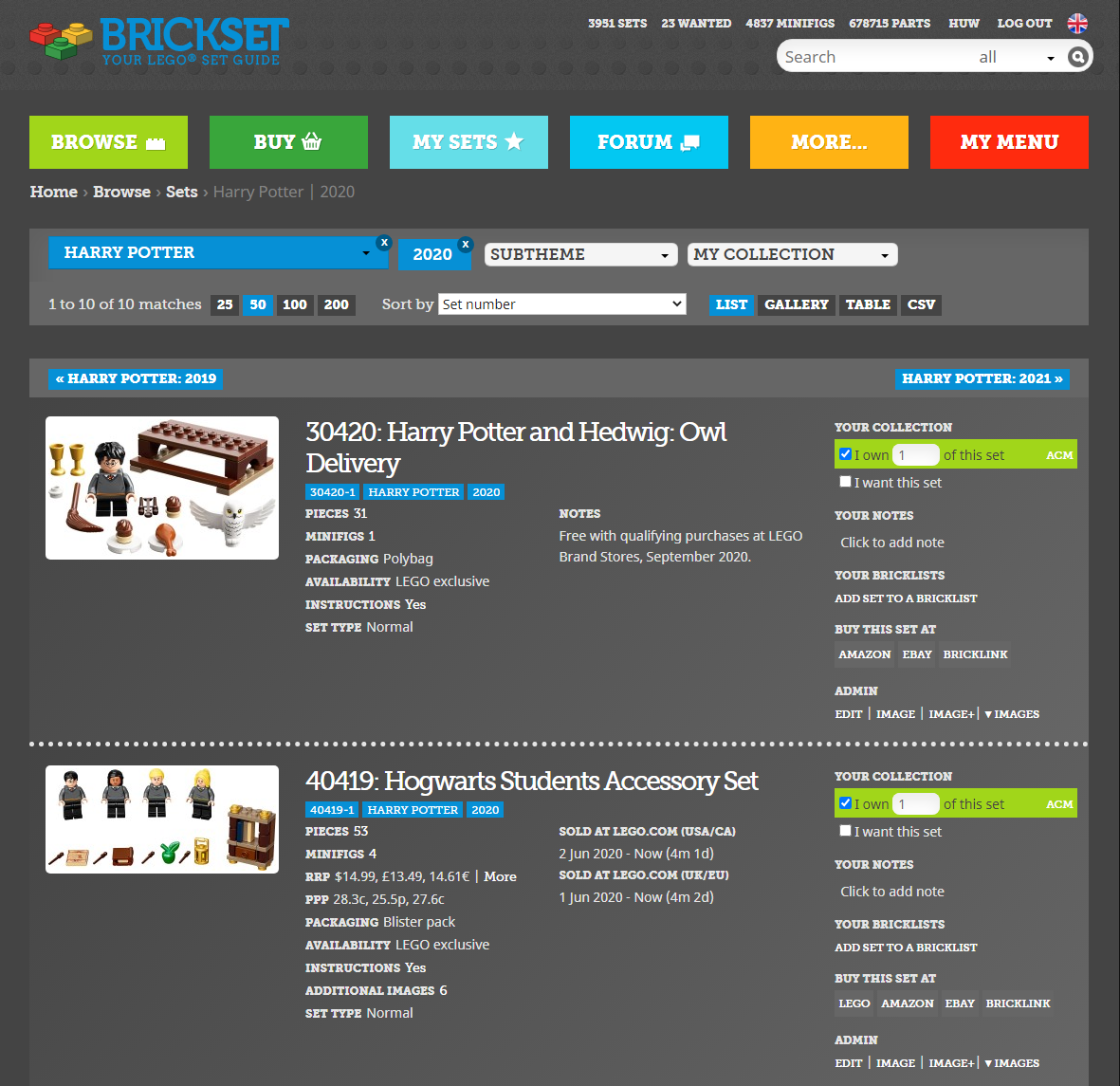
Thanks to everyone that has helped test, and provided feedback on, the new dark mode. I've made a few more changes today in response, including darkening it all down a bit more.
The switch is now next to the country selection button in the header. I've also changed the name of the cookie to prevent problems caused by yesterday's cookie bug so you'll need to select dark mode again if you wish to.
I think the switch may be causing an issue with the display of the links beside it when they first load but I haven't figured out the cause yet.
Please continue to let me know in the comments here, if anything doesn't look right or is illegible: It's still very much a work in progress.
134 likes
33 comments on this article
Hi Huw. On mobile the switch doesn't appear to be working. Interference from the search bar, perhaps, as the two seem to overlap slightly.
EDIT: Switching screen orientation from portrait to landscape sort of works, but it's intermittent.
EDIT 2: Refreshing the page "reactivates" the switch after it's been used.
Same for iPad tablet, had to “request desktop”, then turn screen and bash the area a few times before it toggled. The beta link version “just worked” :)
But great idea I hadn’t really thought I wanted until used it, why it even matches the new 18+ branding!
Works great on my laptop.
The first attempt had muted colors (white looked like light grey).
Much better now!
@Block_n_Roll said:
"Hi Huw. On mobile the switch doesn't appear to be working. Interference from the search bar, perhaps, as the two seem to overlap slightly.
EDIT: Switching screen orientation from portrait to landscape sort of works, but it's intermittent.
EDIT 2: Refreshing the page "reactivates" the switch after it's been used."
You have to press it a few times for it turn on
It works OK on my Android. I'll test with Alice's iPhone later.
Turned it on successfully on my iPad, but turning off doesn’t work even with multiple taps.
Also, having an unlabeled switch isn't exactly good UI design. Well, there might be some hover text for mouse users, but that won't help tablet and phone users.
@Huw said:
"It works OK on my Android. I'll test with Alice's iPhone later."
Having the same problem on my iPhone.
Edit: It seems you specifically have to tap the side of the switch you want the slider to move to in order to activate it. Zooming in helps. Not sure if that’s by design or not.
NOW it works!
And ALL text is clearly readable - this is quite important if you have troubles with sight...
I'll ditch the switch, it's a bit difficult to use on a touch screen device and as you say it's not obvious what it does.
On iOS, as well as the slight overlap with the search bar and lack of label, I think I actually had to swipe the button not tap it, which took me an embarrassingly long time to figure out. But it’s looking great, and thanks - perhaps you underestimated for how many of us Brickset is the first thing we look at in the morning and the last thing at night! I get that you won’t be able to do anything about set images, but there are a few other images with white backgrounds (like amazon logo, prime logo etc) which jar a little, if it’s convenient to find transparent/dark versions?
Ooh, you changed it while I was writing my comment! Love the latest implementation with text - simple, clear and easy to use :)
The switch has been ditched...
@crankybricks , I don't have PNGs of all the logos at the moment but I'll try and hunt them down.
Works fine on my Android phone. Only thing is, I can't see the link to my 'own list'. It was on the left of my username. I liked that shortcut :).
I've removed that link for now, there's not a lot of room up there on phones in portrait mode. It'll be there in landscape.
Works great on Android using the latest Firefox. The link to owned sets is now missing. Possible to wrap it to the next line?
Looks totally awesome on my desktop!
Picking up on GHED's point - I think the site is really well put together but the design and build does have a number of accessibility issues particularly for people with visual impairments.
One of the main issues is the level of colour contrast between text and background in many places (using WCAG 2.1 for guidance - https://www.w3.org/TR/WCAG21/ ) - low contrast can make text hard to read. In the latest iteration of dark mode some of these contrast issues are reduced e.g. the colour contrast on the main style of blue link is an improvement compared to the white background in 'light mode'.
So dark mode is a step forward in terms of accessibility for some.
There are other issues e.g. use of alt text, headings, number lists which could be added to the list of future improvements that would help to make it easier for people with disabilities and users of assistive technology to use the site. Could tie in nicely with Lego's own accessibility efforts such as the new range of Braille bricks.
A simple way to uncover some of these is to use the WAVE toolbar in Chrome or Firefox ( https://wave.webaim.org/extension/ ) although software tools like this are unlikely to uncover all accessibility issues.
^ I agree there are some improvements that need to be made in that regard. I'll install the tool and see what I can do.
Are there are places in particular where you have found legibility problems in 'light' mode?
"Oh, it's beautiful..."
~Director Krennic
Glorious! So much easier on my eyes. *__*
Fantastic addition
With the grey background that is used for photos in reviews, the dark mode has the potential to work exceptionally well here. :-)
The "secondary" tags under a set title (those with the lighter blue background and white text) have reduced legibility in light mode due to the low contrast. In dark mode, this effect becomes even more pronounced.
small bug:
the bullet point images on https://brickset.com/browse
stay dark when darkmode is on --> they become defacto invisible on dark background.
@Huw said:
"^ I agree there are some improvements that need to be made in that regard. I'll install the tool and see what I can do.
Are there are places in particular where you have found legibility problems in 'light' mode?"
Hi Huw
Appreciate the quick response.
Here are some examples where I have spotted contrast issues.
The blue ( 0690D6) used for links in places like the 'What's hot this week' list or "This week's top news articles has contrast ratio of 3.51:1 which falls below the target of 4.5:1 for normal text. In dark mode this ratio is 4.5:1 - right on the WCAG guidance level.
The very light grey used on the 'In The News' H2 header near the top of the main page ( E5E5E5) is very low at 1.25:1. WCAG guidance is a minimum of 3.1:1 for large text like this.
A less prominent one is the grey text ( 848484 ) used against a background of ( EDEDED) in the footer.
Another one is the green used in the 'minifig' tags on set details in the Owned sets view. This is 69 C96C which has a ratio of 2.1:1 against white and should be a lot higher for the size of text.
Possibly one of the hardest contrast issues to resolve without aesthetic changes is the colour of four of the main content buttons (Browse, My Sets, Forum and More) which are all quote low against the suggested contrast level for large text. Dark mode makes no difference to this.
I noticed that the colour of the text in the Brickset logo at the top of the site is 2891 D2 but there is another version used elsewhere e.g. in "This weeks top news articles" ( 1D72A8) which is darker and has better contrast against white/grey in light mode but doesn't work so well against the dark mode background of 222222 . Helps to emphasise the difficulty in getting the balance right.
Hope that this helps. I know it can be hard to resolve colour issues especially when you are trying to offer two viewing modes.
EDIT - realised after posting that all the hash marks from my hex references have been removed :)
I have been looking forward to this.
- Count Dooku
@Jockster, thank you. Addressing most of that would require fundamental changes to the site's look and design but it gives me something to think about.
I’ve looked at this on my PC, on my iPod with Night Shift turned off, and with Night Shift manually enabled. Contrast is much better, at least in terms of legibility. Yellow comments are difficult to distinguish from white comments with Night Shift and Dark turned on (no such issues with red comments), but that’s a minor issue compared to not being able to read red comments at all, or yellow or white comments without great difficulty. Blue text could still use a little more punch. It’s not impossible to read, but it’s definitely not as easy as the other three colors whether or not Night Shift is on.
Actually, on second thought, red might need a boost as well, but at least red only shows up when you’re logged in and reading your own comments.
This is working awesome on my iPhone in Chrome. The only issue I can find is if you view the graphs for your personal collection. Each graph has a white background still which makes the muted numbers next to each bar very hard to see. Ideally the graph backgrounds would be black as well.
Also, thank you for this wonderful improvement to the site, Brickset is definitely well ahead of the curve!
Thank you very much for dark mode!
Wow, just switched to dark mode to see what the fuss is about, and I love it. So easy on the eyes.
It's difficult to read selected text, but I'm loving this dark mode overall! Thanks for always working to refine the website, Huw!
The "Create New Query" page is difficult to read in dark mode.
^ Impossible I'd say! Thanks, I'll get that sorted.